#Basketball Replay Center
I was working on a basketball product and needed a preloader. Not a spinner. Something that set the mood and immediately told you what kind of tool you were about to use.
The visual reference in my head was less "generic sports app" and more command room, control center, replay bunker. I love that aesthetic: wall-sized displays, live feeds, color-coded panels, everything feeling slightly over-instrumented in the best way. The company I was building this for was a sports analytics product for coaches and general managers to analyze live video and data, then generate reports for scouting, game planning, player development, recruiting, and the rest of the weekly workflow around a team.
These were the kinds of references I kept coming back to while building it:
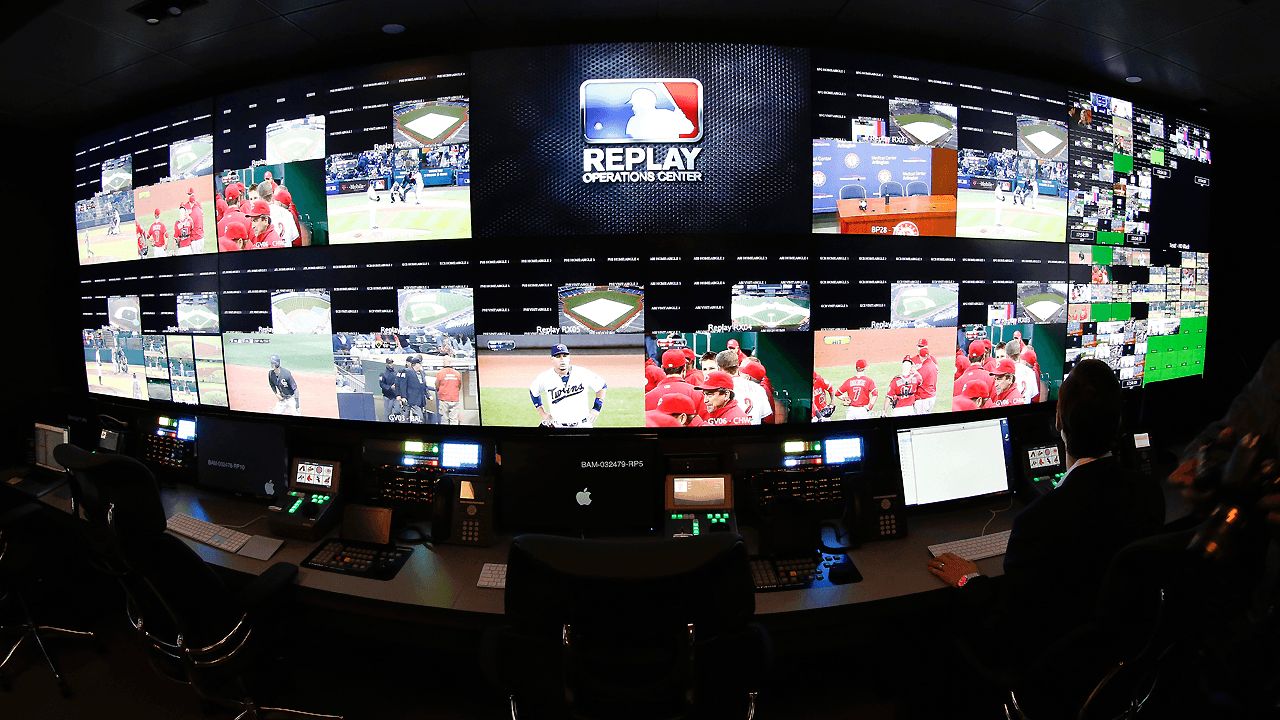
That framing made the preloader direction obvious. The screens boot up, the distortion kicks in, then everything fades out except the logo. The whole thing runs in React Three Fiber with custom shaders, Three.js post-processing, and a GSAP timeline. A few people asked how the CRT effect works, so I figured I'd write it up.
#The CRT screen shader
Each screen in the grid is a plane geometry with a custom shader material. The shader takes a base color, a time uniform, and an opacity, then layers CRT effects on top. Here's what each layer does:
The scanlines are two sine waves at different frequencies moving in opposite directions. The noise is a standard pseudo-random function modulated by time. The rolling bar uses smoothstep to create a narrow bright band that crawls up the screen.
float scanline = sin(vUv.y * 300.0 + uTime * 3.0) * 0.06;
float noise = rand(vUv * 0.5 + fract(uTime * 0.7)) * 0.08;

float rollPos = fract(uTime * 0.15);
float roll = smoothstep(rollPos - 0.04, rollPos, vUv.y)
           - smoothstep(rollPos, rollPos + 0.04, vUv.y);
roll *= 0.15;
Each of these is just a float added to the color channels.
#Selling the CRT look
The basic scanlines read as "retro shader" but not as "actual CRT." Three more layers make it convincing.
Phosphor dot grid. Real CRT screens have a grid of phosphor dots. A sin * sin pattern at high frequency gives you a subtle dot overlay:
float dotGrid = sin(vUv.x * 600.0) * sin(vUv.y * 600.0);
dotGrid = dotGrid * 0.03 + 1.0;
finalColor *= dotGrid;
The * 0.03 + 1.0 maps the range to [0.97, 1.03]. Barely perceptible, but it's what separates "shader filter" from "CRT monitor."
Per-panel vignette. Each screen darkens at the edges:
vec2 edgeDist = abs(vUv - 0.5) * 2.0;
float panelVignette = 1.0 - dot(edgeDist, edgeDist) * 0.3;
Chromatic shifting. Instead of applying noise uniformly, each RGB channel gets a different amount. R gets more noise, G gets the secondary scanline, B gets the rolling bar. This subtle misalignment makes the color feel unstable, like a real broadcast signal.
#Video textures through the shader
The screens play actual video clips. Each panel loads an MP4 as a VideoTexture and pipes it through the CRT shader:
const video = document.createElement("video");
video.muted = true;
video.loop = true;
video.playsInline = true;
video.src = videoSrc;
video.play();

const texture = new THREE.VideoTexture(video);
materialRef.current.uniforms.uTexture.value = texture;
materialRef.current.uniforms.uHasTexture.value = 1.0;
Inside the shader, the video gets mixed with the base tint:
baseColor = mix(baseColor, texColor.rgb * uBrightness, 0.85);The 0.85 mix means the video mostly dominates but the CRT color tint bleeds through. That's what gives each screen its distinct color cast.
#Barrel distortion post-processing
The entire scene passes through a post-processing pipeline. The custom pass does barrel distortion, chromatic aberration, and a scene-wide vignette. Crank the distortion up to see the CRT bulge, and watch how the chromatic aberration splits the grid colors at the edges:
vec2 barrelDistortion(vec2 uv, float distortion) {
  vec2 shifted = 2.0 * (uv - 0.5);
  float r2 = dot(shifted, shifted);
  shifted *= (0.88 + distortion * r2);
  return shifted * 0.5 + 0.5;
}
distortion * r2 pushes pixels farther from center more, creating the CRT bulge. Chromatic aberration splits R, G, B by sampling at different distorted UVs. The aberration scales with distortion (1.0 + uDistortion * 0.5), so when the barrel effect ramps up, the fringing intensifies with it.
#Animating shader uniforms with GSAP
GSAP can't directly tween a shader uniform. It needs a plain JavaScript object. The bridge is a proxy:
const distortionProxy = { value: 0, glow: 0 };

tl.to(distortionProxy, {
  value: 0.35,
  duration: 1.8,
  ease: "power2.inOut",
  onUpdate: () => {
    distortionControl.setDistortion(distortionProxy.value);
  },
});
GSAP tweens distortionProxy.value from 0 to 0.35. On every tick, onUpdate pushes the value into the shader uniform.
For individual panels, GSAP can tween .value on a Three.js uniform directly because it's just { value: number }:
tl.to(panel.material.uniforms.uOpacity, {
  value: 1,
  duration: 0.5,
  ease: "power2.out",
});
The full animation runs in five phases: boot-up, distortion ramp, hold, fade-out, and logo reveal, all in a single timeline. Panels are sorted by Manhattan distance from center for the stagger: Math.abs(col - 2) + Math.abs(row - 1). Center first, corners last. On fade-out, it reverses.
#Full thing
#What I'd do differently
Video loading is fire-and-forget. On slow connections, panels stay dark. A per-panel loading state with animated static noise would look better and mask the delay.
The responsive scaling uses a hardcoded aspect ratio breakpoint. A proper solution would compute the camera frustum to fit the grid at any ratio.